
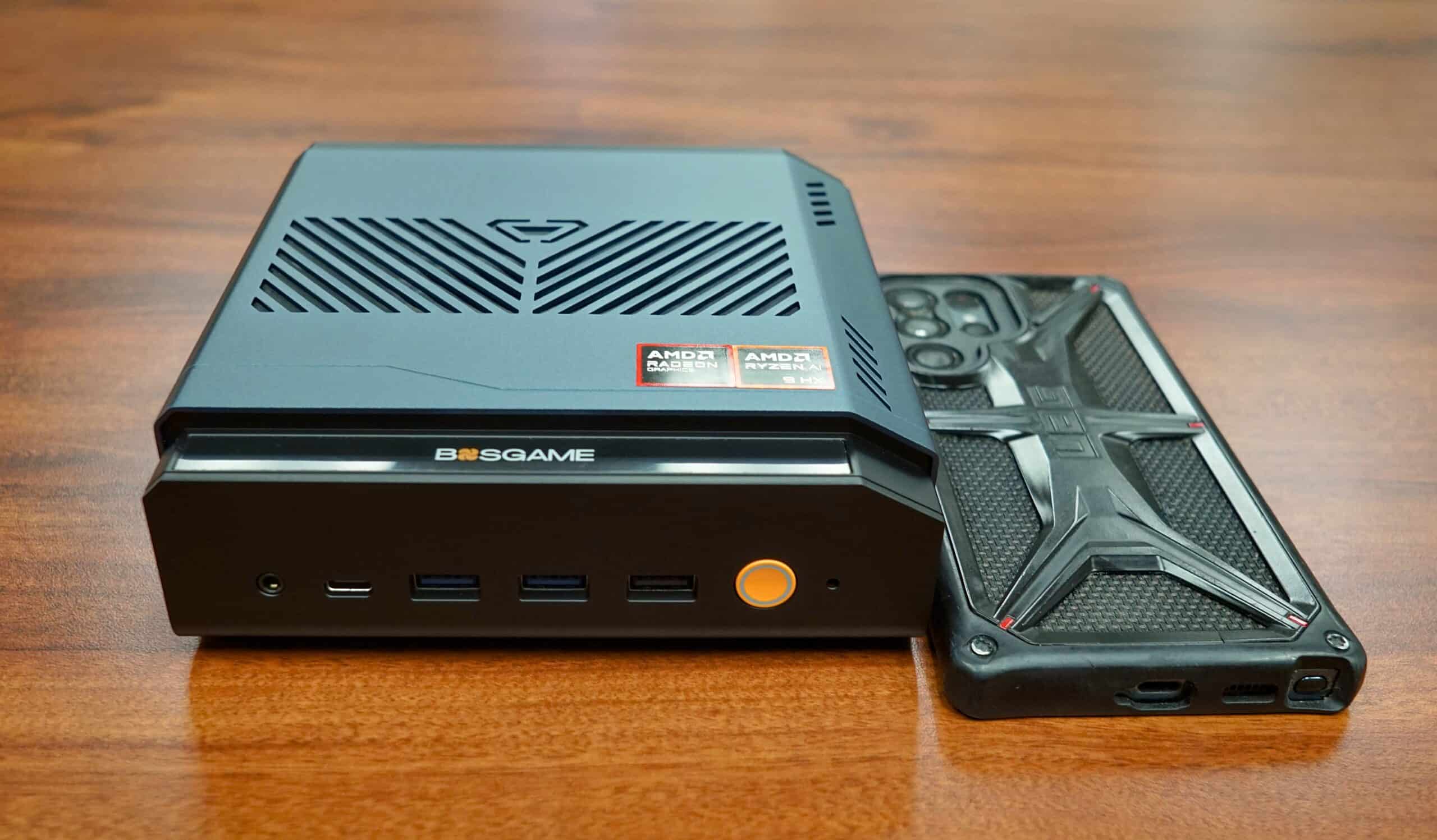

Linux, Local LLM and Games
Taran Rampersad shares his experience bringing a dedicated LLM PC online.
The BOSGAME VTA-439 arrived through Aeropost in good condition, though the external box had apparently shown it’s value. Customs had taken a peek and seen there was nothing to hide. The actual product box was fine, as was the VTA-439 itself. I’d outlined on KnowProSE.com why I had selected the BOSGAME VTA-439.
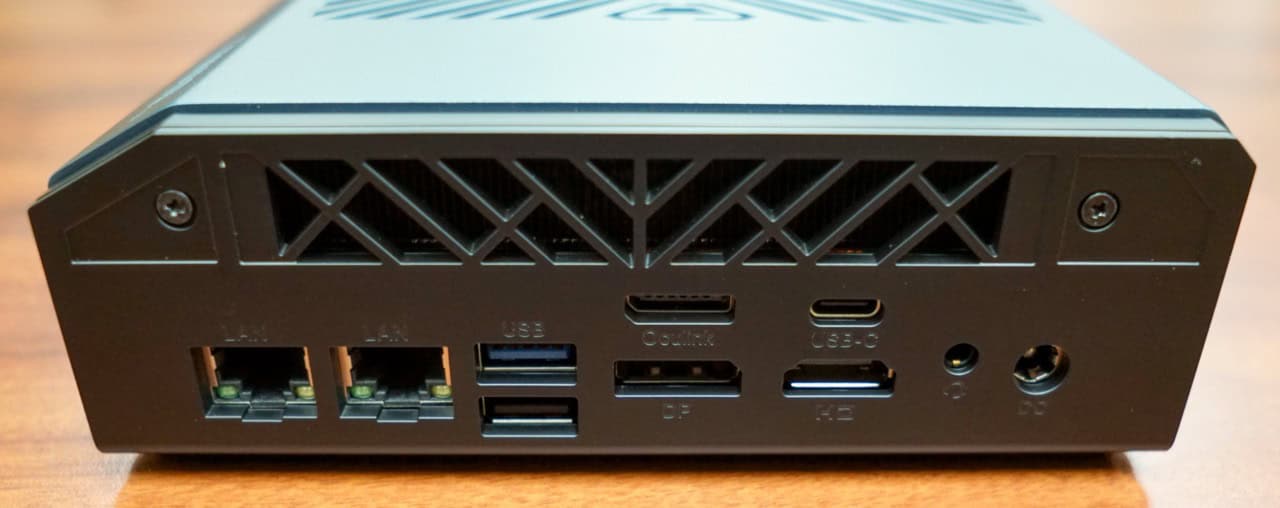
No part of the computer felt cheaply manufactured. It feels sturdy. It has easily accessible ports. And opening the system takes is with a simple small phillip head screw.
Highlights
- Expandability: Up to 256 gigabytes of DRAM, and 8 terabytes of SSD space.
- OcuLink: Connects directly to the PCIe lanes at 64 Gbps, offering vastly higher bandwidth than standard USB4 or Thunderbolt 4. And I can use an external desktop graphics card like the RTX 4070 or 7800 XT via that OCulink dock.
- Demonstrated Linux usability out of the box.
One reason I picked it up was to experiment more with local LLMs using Ollama. In that context, Linux is the better choice.
- Memory Management: Linux has far lower idle RAM overhead than Windows (roughly 0.5GB vs. 4GB), leaving more system memory available if your model spills over onto CPU RAM.
- VRAM Efficiency: Under heavy context loads, Linux uses slightly less VRAM for overhead, giving your GPU a bit more breathing room to load larger models.
- Speed: Linux is marginally faster at model loading and sequential reads because it lacks the background virtualization and aggressive file-locking or antivirus interruptions found on Windows.
Knowing that, I planned to run Linux and it’s presently running Ubuntu 26.04 LTS. This article was written on it.
Step One: Emergency Repair Disk for Windows 11.
If you’re not worried about going back to Windows 11, I’d advise skipping this step. Save yourself 5 hours.
The system came with Windows 11. Normally I would have just blown it away with a Linux install, but some people might want to back up the original installed operating system. It’s not a terrible idea, at least on the surface.
Booting into Windows 11 had me being interrogated by Microsoft. The joy I had upon unboxing the machine was drawn out of me one click at a time. Certainly, time and date are understandable, but right off the bat I had to turn down Microsoft Office 365.
Microsoft wanted my permission to turn on all sorts of optional things for a better experience. 2 hours later, it finally got done with it’s interrogation between reboots, updates, and apparently a number of questions and clicks proportional to the size of their legal department.
I plugged in a 32 gigabyte USB key, and started the backup of the Windows 11 operating system.
Threee hours and 15 gigabytes later, that was done. There was no joy left in me, so I decided to start the Linux part the next morning. The joy would come back. I hoped.
Five hours total being interrogated and backing up an operating system that I didn’t want.
Step Two: Ubuntu 26.04 LTS Install
Fresh in the morning, I had already put the ISO of Ubuntu 26.04 LTS onto a USB key using Rufus, so it was a matter of selecting the drive to boot from during the boot process. I poked around first, verifying that Bluetooth and WiFi were not having issues, and then I started the install off the USB key.
Ubuntu was configured and installed within 30 minutes, painlessly.
Other Stuff Installed
Fifteen minutes had LibreOffice installed, as well as Steam for my games.
Fifteen more minutes to install Ollama for running local AI models up to 30B, though that will require some quantization with only 32 Gigabytes on the new system.
I wanted some joy, so I downloaded my Homeworld related games on Steam that are in my library to stress the graphics and processor with big maps and big challenges.
It’s a new machine. I’ve an excuse to game. So I spent most of the day doing just that and… not having a single problem with any of the games. Homeworld 3 is 2 years old at this point, so I didn’t expect issues. I stressed the system with large maps.
It laughed at me. My playing ability was outmatched by its rendering on a game that’s only 2 years old (Homeworld 3). I clearly need to work on my playing ability this weekend.
I suppose I could have tried some first person shooters (FPS), but that’s just not my thing. Where an RTS stresses the processor more is related to the groups of ships and vehicles in a 3D space, calculating line of sight fire, etc. The VTA-439 turned on its fan a few times, but never for long.
I had not worked the machine hard. It was well within its comfort zone.
Ollama – Olmo3:32b-think LLM model loaded
While I don’t advocate the use of LLMs for thinking tasks, I do experiment with models for various reasons. One of the key reasons I got this computer was its expandability that will make it more powerful in the future, when DDR5 5600 RAM’s cost is closer to its actual value.
I’ve been experimenting with 7B models before. Now I can run 32B models, quantized, locally, completely on the local machine.
Downloading the Olmo-3 32b LLM model took much longer than anything else. 19 Gigabytes took about an hour.
Then I ran into something I had expected: Ollama wasn’t automatically making the best use of that hardware. So rather than replacing anything, I changed the software configuration to tell Ollama how to use the AMD graphics processor properly, and changed the computer’s firmware settings to reserve more RAM for it.
In effect, I wasn’t making the computer faster. I was removing restrictions that were preventing the Ollama from using hardware that was already there.
I ran my first prompt from the terminal window, asking about epistemology and LLMs. In 6 minutes, it not only gave me a response but showed how it came up with the answer (PDF here).
Final Notes
Most technology reviews are biased toward what you should buy now, but the real test is how long that technology will last. This machine, knock on wood, seems to have lasting ability. I expect it will get at least 3 years of service out of it.
When I chose the Linux distro, I got a little blowback from some within the Linux community after selecting Ubuntu. There are other distributions that will work on it, like CachyOS.
Where Ubuntu shines is the enterprise, and I chose Ubuntu to demonstrate that an enterprise Linux distribution works well on the system.
If you’re using it in an office, it might be worth going for a Ubuntu Pro subscription, at least until we have enough people locally to support the various Linux distributions at an enterprise level.
The model I chose for the testing is Olmo-3, largely because I had been running Olmo-2 models for experimentation on less powerful systems. With this new capacity, I can run many more models, and as memory prices come down, I can add more.
In summary, I got an expandable machine that I installed an enterprise operating system on, that can play games and play videos, and can run larger LLM models locally. When I turn it on, it’s on immediately, and it does everything I could possibly want.















 In a US university film lab,...
September 7, 2026
In a US university film lab,...
September 7, 2026
 Declaring independence from mobile roaming
August 31, 2026
Declaring independence from mobile roaming
August 31, 2026
 Urgency, awareness needed to combat sextortion
August 24, 2026
Urgency, awareness needed to combat sextortion
August 24, 2026
 The silent, growing danger of ransomware
August 17, 2026
The silent, growing danger of ransomware
August 17, 2026
 How should a newsroom of the...
August 10, 2026
How should a newsroom of the...
August 10, 2026
 FNP’s halting stumble to dubious relevance
August 3, 2026
FNP’s halting stumble to dubious relevance
August 3, 2026
 Samsung’s big bet on AI
July 27, 2026
Samsung’s big bet on AI
July 27, 2026
 The data centre dilemma
July 20, 2026
The data centre dilemma
July 20, 2026
 How should business and government embrace...
July 13, 2026
How should business and government embrace...
July 13, 2026
 How influencer marketing works in the...
July 5, 2026
How influencer marketing works in the...
July 5, 2026
 Yes, a website is work. Yes,...
June 29, 2026
Yes, a website is work. Yes,...
June 29, 2026
 No more fire in these wires
June 22, 2026
No more fire in these wires
June 22, 2026
 What the heck is chip binning?
June 14, 2026
What the heck is chip binning?
June 14, 2026
 Solving the region’s journalism problem
June 8, 2026
Solving the region’s journalism problem
June 8, 2026
 Tambini to journalists: “Keep doing what...
May 31, 2026
Tambini to journalists: “Keep doing what...
May 31, 2026
 How do we unfetter journalism from...
May 25, 2026
How do we unfetter journalism from...
May 25, 2026
 What the Canvas hack tells us...
May 15, 2026
What the Canvas hack tells us...
May 15, 2026
 Ghost women in AI? Hardly!
May 10, 2026
Ghost women in AI? Hardly!
May 10, 2026
 IShowSpeed: Here and gone
May 4, 2026
IShowSpeed: Here and gone
May 4, 2026
 How TT journalists can turn modern...
April 26, 2026
How TT journalists can turn modern...
April 26, 2026